


Three weeks into first year, my flatmate’s gaming laptop died during a 4,000-word essay submission window. The thing weighed nearly 3kg, lasted maybe two hours off charge, and the fans sounded like a hoover the entire time he owned it. He’d bought it because it looked powerful. That’s the wrong way to choose a laptop for uni.
Here’s what actually matters: the best laptops for college students aren’t the most powerful or the most expensive — they’re the ones that fit how you actually live, which means surviving all-day lectures on a single charge, not destroying your shoulders on the walk across campus, and handling your specific coursework without grinding to a halt three years in. You can get all of that for £400–£1,200 if you buy smart.
What Do You Actually Need?
Battery life first. Always battery life first. Marketing specs are fiction — a laptop claiming “up to 18 hours” probably delivers 10 under real conditions, which is still fine for a long day on campus, but you need to know what you’re actually getting. Aim for real-world estimates of 8–10 hours minimum; anything less and you’re hunting for plug sockets in the library like everyone else.
Weight is the thing most buyers underestimate until they’ve carried a 2.4kg machine across campus for a fortnight. A 1.3kg ultrabook feels like nothing after a while. A heavy laptop genuinely starts to feel like a punishment by week three, and the resentment builds faster than you’d think — especially during exam season when you’re already carrying textbooks, a water bottle, and whatever else accumulates in a student bag. For pure portability, anything under 1.5kg is the target.
On specs: an Intel Core i5 or AMD Ryzen 5 from 2024–2025 handles essays, spreadsheets, light coding, and browser-heavy research without complaint. RAM matters more than most buyers realise — 8GB is survivable but 16GB is where multitasking actually feels comfortable. Storage-wise, 256GB SSD gets tight fast once you’ve installed Office, your course software, and a few months of files; 512GB is the comfortable starting point.
The Campus Carry Options
Portability is non-negotiable if you’re moving between lectures, the library, and seminars all day.

Best for students who need to carry their laptop across campus daily without weight fatigue
Apple, MacBook Neo 13-inch Laptop (A18 Pro £649 (7% OFF — was £699)

Ideal for commuting students and those who move between libraries and lecture halls frequently
Todo Robo, Apple MacBook Pro 14.2-inch Laptop £2399 (4% OFF — was £2499)
The trade-offs with ultrabooks are real but manageable. Ports are often limited to USB-C only (a hub fixes this for about £20), and a 13-inch screen can feel cramped for design work. But for note-taking, essays, research, and the occasional spreadsheet, a slim machine with 10+ hour battery life handles student life better than anything heavier.
Budget Tiers — Honestly Assessed
Under £500 is where Chromebooks live, and they’re better than their reputation suggests — if your course doesn’t require specialist software. They boot in seconds, never accumulate the kind of software bloat that slows Windows machines down over time, and you genuinely don’t worry about viruses. The real problem isn’t the price or the speed. It’s that ChromeOS can’t run Photoshop, MATLAB, AutoCAD, or most discipline-specific tools, which rules them out for a large chunk of students before they’ve even started.

Best budget option for students primarily using cloud-based tools and web applications
Samsung, Galaxy Chromebook Go Wi-Fi Laptop (11.6-inch £169 (43% OFF — was £299)

Affordable Windows laptop for students needing traditional software compatibility on a tight budget
£500–£800 is the sweet spot. Full stop.
At this price you get 16GB RAM, processors that won’t feel dated in 2027, and build quality that survives being shoved in a bag daily. The Lenovo IdeaPad range lives here and consistently punches above what the price suggests — not glamorous, but genuinely reliable in a way that matters more than it sounds when you’re on a deadline at midnight.

Best value for students needing reliable performance for essays, coding, and multimedia projects
Lenovo, IdeaPad Slim 3 15IRH10 Intel Core i5-13420H 16GB RAM 512GB SSD 15.3″… £599

Strong mid-range option combining portability with enough power for most university coursework
Above £800, you’re paying for dedicated graphics, faster storage, better screen quality, and build materials that survive four years of genuine abuse. Engineering and design students aren’t being extravagant buying here — they’re buying tools their software actually requires.
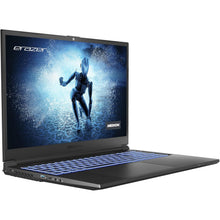
Premium option for engineering and design students needing serious processing power and graphics capability
MEDION, Erazer P10 – Intel Core i7-12700H, 16GB RAM, 512GB SSD, NVIDIA… £849
Does Your Subject Change Everything?
Yes. Completely.
Engineering, Architecture, CAD: Autodesk, CATIA, Revit — these are genuinely hungry applications, and running them on underpowered hardware isn’t just frustrating, it actively slows your work down in ways that cost you time on deadlines. You want an Intel Core i7 or AMD Ryzen 7, at least 16GB RAM (32GB if you can stretch to it), a dedicated GPU, and a 15–16-inch screen because staring at CAD models on a 13-inch display is its own kind of misery. Budget minimum £900, and treat it as a course requirement rather than an upgrade.
Design, Video, Photography: Similar processor and RAM requirements to engineering, but screen quality matters more here than raw speed. Look for 100% sRGB coverage and good brightness — colour-accurate displays cost more, but working on a screen that renders colours inaccurately and then submitting work that looks different in print is a genuinely painful lesson to learn once. Fast NVMe storage also makes a real difference when you’re exporting video.
Arts, Humanities, Social Sciences: An i5 or Ryzen 5, 8–16GB RAM, and 256–512GB storage handles everything you need. Lightweight and cheap is the brief. Your bottleneck on most days will be your internet connection, not your processor.
Computer Science, Programming: Here’s one that surprises people — most coding is not actually demanding on hardware. What matters more is a keyboard you can type on for hours without hating it (actually test this before buying), fast storage so builds don’t drag, and 16GB RAM for running local servers and multiple tools simultaneously. £500–£900 covers the range well.

Suitable for computer science and programming students needing responsive performance and reliable uptime
Samsung, Galaxy Book4 Pro 360 £1498.98 (25% OFF — was £1999.99)
Mistakes Worth Avoiding
Gaming laptops are not student laptops. They’re heavy, they destroy battery life chasing performance headroom you won’t use in lectures, and you’re paying for cooling systems and RGB lighting that contribute nothing to a 3,000-word essay. Unless you’re actually gaming seriously, leave them alone.
128GB storage sounds fine until it isn’t. Office alone eats 4–5GB. Your course software, a semester’s worth of files, and a few downloads later, you’re getting low-storage warnings by November. Don’t do it to yourself.
Also watch out for last year’s clearance stock at tempting prices — sometimes it’s a genuine deal, sometimes there’s a reason that model is being shifted. Actually, that’s not quite right to say universally: some clearance stock is excellent value and simply reflects a retailer clearing inventory ahead of a new release rather than any problem with the unit. Check independent user reviews, not retailer descriptions, before deciding.
Getting Money Off
Sign up for Unidays and Student Beans before you buy anything. Free to join, 10–15% off at most major retailers, and they work on laptops specifically — that’s £60–£90 back on a £600 machine for about three minutes of registration.
August back-to-uni sales and Black Friday in November are genuinely the best times to buy, with discounts that go deeper than the standard student schemes. If your timeline is flexible, waiting for one of those windows is worth it. And before you finalise anything, ask your university’s IT or tech support office whether they have partnerships with Dell, Lenovo, or HP — some universities have negotiated pricing that undercuts the high street by a significant margin, and it’s the kind of thing that never gets advertised loudly enough.
Always check the return window too. Fourteen days is standard, thirty days is generous, and that difference matters if the keyboard feels wrong after a week of actual use.
The honest answer, after all of this, is that your subject and your honest budget narrow the decision down faster than any spec comparison. An engineering student with £1,000 should buy something with real processing power and a dedicated GPU. An English student with £500 should buy the lightest, longest-lasting machine in that range and spend the rest on rent. Don’t let a mate’s MacBook or a convincing shop display push you toward something that doesn’t fit either of those parameters — a laptop that’s wrong for your life is a bad laptop regardless of the specs on the box.
Hey savvy shoppers! When the items in our articles catch your eye and you decide to buy through our links, we may earn a small commission at no extra cost to you. Think of it as a way of supporting us in bringing you the best content!
Frequently Asked Questions
How much should a student spend on a laptop in the UK?
Most students do well in the £500–£800 range. That gets you 16GB RAM, a solid processor, and enough storage for three or four years of coursework. Engineering and design students should budget closer to £900–£1,200 for software like AutoCAD or Premiere Pro. Arts and humanities students can genuinely get away with £400–£500.
Is a MacBook worth it for university?
It depends entirely on your course. MacBooks are genuinely excellent — great battery life, light, and they hold their value. But they’re expensive, and if your course requires Windows-only software like certain CAD tools or MATLAB configurations, you’ll either need Boot Camp or a separate Windows machine. Check with your department before committing.
What’s the minimum RAM a student should have?
8GB is the absolute floor, but I’d push hard for 16GB if your budget allows it. The difference in day-to-day use is real — browser tabs, Office, Spotify, and a PDF open simultaneously will bog down an 8GB machine noticeably. 16GB keeps things smooth and means the laptop won’t feel sluggish in two years.
Are Chromebooks good enough for university?
For some students, yes — genuinely. If your coursework lives in Google Docs, Google Sheets, and a web browser, a Chromebook is fast, cheap, and practically virus-proof. The problem is specialist software: Photoshop, MATLAB, Visual Studio, and most CAD programs won’t run on ChromeOS. Check what your course actually requires before going this route.
When is the best time to buy a student laptop?
August back-to-uni sales and Black Friday in November are when prices drop most noticeably. If you can hold off until one of those windows, you’ll typically save 10–20%. Also worth checking: your university’s tech partnerships with Dell, Lenovo, or HP often beat anything on the high street.



 No products in the cart.