


Here is something most people only realise after years of desk work: the keyboard is the one piece of equipment you touch more than anything else, and almost nobody picks it deliberately. They use whatever shipped in the box, or whatever was cheapest on the shelf. Then one day their wrist starts aching, or a key stops registering mid-sentence, and suddenly the decision they never made feels very expensive.
Upgrading to one of the best keyboards UK retailers currently stock is one of those changes that pays off almost immediately — in comfort, in speed, and in that hard-to-quantify sense that your tools are actually on your side. This guide covers what genuinely matters when choosing a keyboard, which types suit which situations, and where the best value sits right now across different categories.
Why this decision matters more than you think
Most people ignore their keyboard until something breaks. That is the wrong approach. By the time a key stops working or your pinky starts protesting, you have already spent hundreds of hours typing on something that was working against you. The right keyboard is responsive enough that you are not fighting missed keypresses, comfortable enough for a full eight-hour day without your hands staging a revolt, and suited to the way you actually work — whether that is rapid-fire typing, precision gaming, or shuffling between a laptop and a desktop all afternoon. I switched from a cheap bundled membrane board to a proper mechanical keyboard a few years back, half-expecting to feel silly about spending the money. Within a week I was genuinely annoyed I had waited so long. The difference in how typing feels — the feedback, the consistency, the way your fingers just know when a keypress has registered — is not subtle at all.
Budget matters, but it is not the main thing. You do not need to spend £200. What you need is something that matches your actual priorities.
The main keyboard types, honestly explained
Mechanical keyboards
Mechanical keyboards use individual switches under each key. Each press activates a physical mechanism, which is why they feel satisfying and why gamers tend to prefer them. They are durable, rated for 50 million keystrokes or more, and they come in different switch types with different feels — clicky, tactile, or smooth linear, depending on your preference. The downsides are real though: they cost more, they are louder, and if you are in an open office or sharing a room with someone who is trying to sleep, that noise matters.
Membrane keyboards
Membrane keyboards use a rubber dome layer beneath the keys. Quieter. Cheaper. Lighter. They work perfectly well for general office typing, and the reputation they have for feeling terrible is mostly earned by the very cheapest examples — a decent mid-range membrane board is genuinely fine for most people.
Ergonomic keyboards
Ergonomic keyboards are designed around your body rather than around manufacturing convenience. Split designs let your hands sit at a natural angle. Curved boards guide your wrists into a neutral position. Some tilt to reduce the bend at your wrist joint. They have a learning curve — expect a week or two of slightly slower typing while your brain adjusts — but most people find that adjustment completely worth it once the discomfort in their wrists and shoulders fades.
Wireless keyboards
Wireless keyboards connect via Bluetooth or a 2.4GHz USB receiver. They are excellent for reducing cable clutter and for people who switch between devices throughout the day. Modern wireless keyboards have largely solved the lag problem — honestly, most people will never notice the difference. Battery life on quality models is measured in months, not days.
Laptop-style low-profile keyboards
Laptop-style low-profile keyboards are flat, portable, and space-saving. They are not ideal for long typing sessions because the shallow key travel does not encourage good posture, but for hot-desking or travel they are a practical choice.

Best wireless keyboards for reducing desk clutter and cable management
Logitech, MX Mechanical Mini for Mac Wireless Illuminated Keyboard £119.99

Top mechanical keyboards for satisfying typing feel and gaming performance

Ergonomic keyboards designed to reduce wrist strain during long work sessions
JOMAA, White Backlit Ergonomic Split Keyboard Bluetooth 2.4G Wireless… £72.59
Going wireless: worth it, or just trendy?
The short answer is yes, genuinely worth it — with some caveats.
A wireless keyboard earns its place if you are tired of cable clutter, if you move between a desktop and a laptop throughout the day, or if you just want the desk to look like a workspace rather than a tangle of leads. The things to check before buying: battery life (aim for at least a month between charges, because hunting for a charging cable mid-deadline is not fun), connection type (2.4GHz receivers are generally more stable than Bluetooth, though good Bluetooth boards have closed that gap considerably), and compatibility with your devices. Most modern wireless keyboards work across Windows, Mac, and iPad, but always verify rather than assume.

Sleek rechargeable wireless keyboard for modern minimalist desks
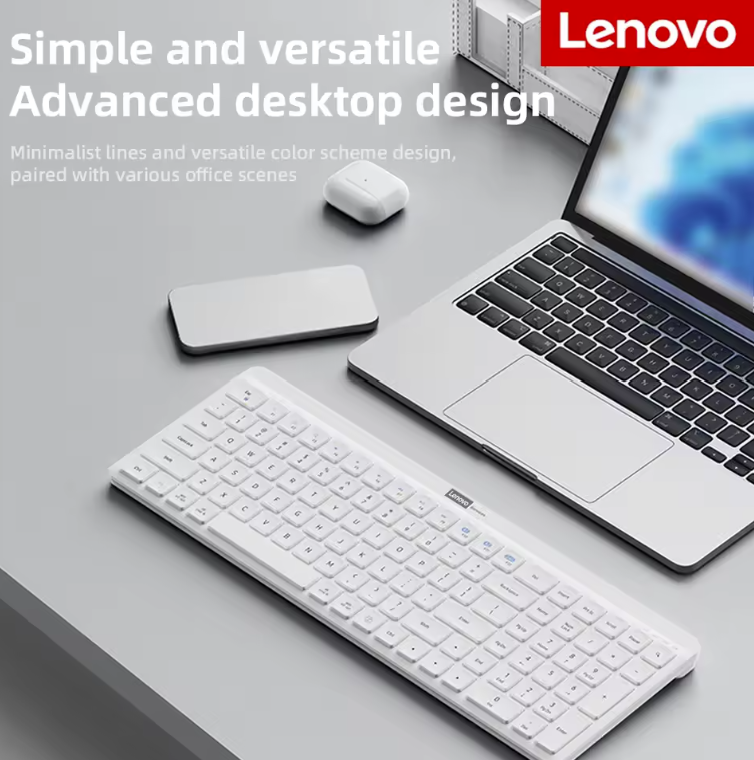
Wireless keyboard compatible with multiple devices for flexible working
Ergonomic keyboards are preventative medicine, not a luxury
If you are spending six or more hours a day at a keyboard and you have had wrist pain, that persistent ache in your forearms, or the ‘my shoulders are furious with me’ feeling at the end of the week — an ergonomic keyboard is not a nice-to-have. It is addressing a problem before it becomes a genuinely expensive one, both in terms of medical bills and lost work time.
Actually, that is not quite right — calling it ‘preventative’ undersells it. For plenty of people, the improvement starts within days of switching. The design logic is straightforward: standard keyboards force your hands into an inward rotation that puts sustained strain on tendons and joints, while split or curved boards let your hands rest in the position they naturally fall into when relaxed at your sides. Prices run from around £40 for a basic curved membrane board up to £150 or more for a premium split mechanical option, and somewhere in the middle of that range is where most people find the right balance of comfort and cost.

Split ergonomic keyboard with wrist rest for optimal hand positioning
JOMAA, Full Size Wireless Ergonomic Keyboard with Palm Rest £50.79 (55% OFF — was £112.87)

Curved ergonomic keyboard designed to reduce strain during extended typing sessions
Do you actually need separate gaming and work keyboards?
Gaming keyboards and productivity keyboards have different priorities on paper. Gaming boards push response time and tactile precision — mechanical switches, programmable keys, macro support, the whole setup. Productivity boards lean toward quiet operation, sustained comfort, and reliability over flash. Both camps make keyboards with real strengths.
You probably only need one.
A good mechanical keyboard sits comfortably in the overlap: responsive enough for gaming, quiet enough (with the right switch choice) for office hours, and durable enough to last years. Mechanical boards are not nearly as expensive as they were five years ago, which changes the calculus considerably. If you are doing both gaming and desk work, buy one board that handles both reasonably well rather than compromising on two mediocre ones — the Redragon K582 at under £35 is a decent example of how far the budget end of mechanical has come.

Versatile mechanical keyboard suitable for both work and gaming

Quiet productivity-focused keyboard for distraction-free office work

Affordable, dependable keyboard for basic typing and everyday office tasks
StarTech.com, WRSTRST Foam Keyboard Wrist Rest for Ergonomic Typing… £16.8
The practical buying checklist
A few specifics worth checking before you commit. Key travel — how far each key moves when pressed — affects how typing actually feels; most people prefer at least 1.5mm, and mechanical switches typically give you 2mm or more. Layout is worth thinking through: full-size boards include a number pad, tenkeyless (TKL) drops it and reclaims desk space, and 75% boards compress things further while keeping most function keys intact. Build quality is genuinely worth paying attention to, because a board that feels hollow and plasticky on day one will feel worse on day three hundred. And if you have the chance to try a keyboard in a shop before buying, take it — hands vary, and what reads as ‘satisfying tactile feedback’ in a review might feel completely wrong to you in person.
The best keyboards UK shops stock right now span a wide range of prices and purposes, and there is genuinely something solid at every level. The trick is not chasing the most impressive spec sheet or the flashiest RGB pattern — it is buying something that suits how you actually work. Get that right, and it is one of those purchases you will stop thinking about entirely, in the best possible way.
When items in our articles catch your eye and you decide to buy through our links, we may earn a small commission at no extra cost to you. Think of it as a way of supporting us in bringing you the best content!
Frequently Asked Questions
What is the difference between mechanical and membrane keyboards?
Mechanical keyboards use individual physical switches under each key, giving a tactile, satisfying feel and lasting around 50 million keystrokes. Membrane keyboards use a rubber dome layer, which makes them quieter and cheaper. For heavy daily typing or gaming, mechanical tends to win on feel and longevity. For basic office work on a budget, a decent membrane board is genuinely fine.
Are wireless keyboards reliable enough for gaming?
Modern 2.4GHz wireless keyboards have response times close enough to wired that most gamers won’t notice any difference during normal play. Bluetooth connections can introduce slightly more latency, so if you’re competing at a high level, a 2.4GHz receiver or wired connection is the safer call. For casual gaming and everyday use, wireless works well.
Do ergonomic keyboards actually help with wrist pain?
Yes, for many people they make a real difference. Split and curved keyboard designs keep your wrists in a more neutral position, reducing the inward rotation that causes strain over long sessions. There’s a learning curve of roughly one to two weeks, but most people who switch report noticeably less discomfort. If you’re already experiencing wrist or shoulder pain, it’s worth trying one before the problem gets worse.
What keyboard size should I buy — full size, TKL, or 75%?
Full-size keyboards include a number pad, which is useful if you enter lots of figures or use shortcuts that rely on it. Tenkeyless (TKL) boards drop the number pad and free up a surprising amount of desk space, making mouse movement more comfortable. 75% boards compact the layout further while keeping most function keys. If you don’t use the number pad regularly, TKL or 75% is usually the better choice for comfort and desk space.
How much should I spend on a good keyboard in the UK?
You can get a reliable, comfortable keyboard for £25–£60. That range covers solid wireless options, decent mechanical boards, and basic ergonomic designs. Spending £80–£150 gets you premium build quality, better switches, and more features. Beyond £150, you’re paying for enthusiast-grade materials and customisation. Most people get the best value somewhere in the £40–£90 range.



 No products in the cart.