

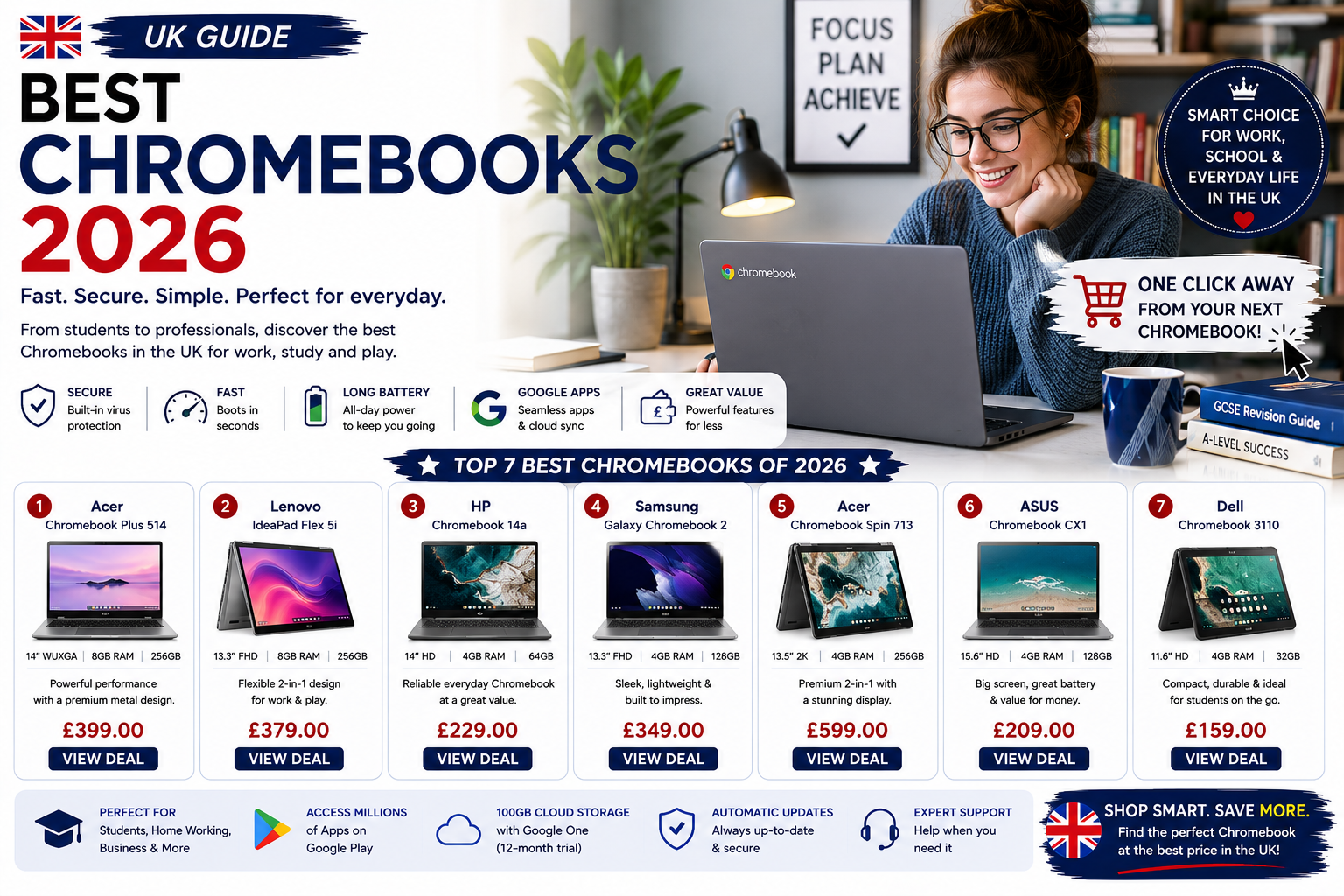
Here is a mildly unpopular opinion: the best Chromebook for most people costs under £300, and spending more won’t make their day noticeably better. I landed on this conclusion after spending several months using these machines as my main devices — not testing them in some controlled environment, but actually relying on them for work calls, writing, and the kind of chaotic 25-tab browsing sessions everyone pretends they don’t do. The results surprised me.
But let’s back up, because if you’re still on the fence about Chromebooks in general, the case for them is stronger than it’s ever been.
Why Chromebooks Actually Make Sense Now
Chrome OS has quietly grown up. Early Chromebooks were essentially expensive browsers bolted onto cheap plastic, and the criticism was fair. That’s not what these machines are anymore. Modern Chromebooks run Android apps, handle offline work reasonably well, and boot up in the time it takes to read this sentence. They’re also secure by design — no antivirus software, no surprise updates eating your battery at the worst possible moment, no malware anxiety. The security architecture is baked in at a fundamental level rather than bolted on as an afterthought, which means you’re genuinely protected without having to think about it. If you live in the Google ecosystem already — Gmail, Drive, Meet, Sheets — switching to a Chromebook doesn’t feel like a compromise. It feels obvious.
Weight matters more than people admit. Most Chromebooks come in under 1.5kg, and after a week of commuting with one versus a heavier Windows laptop, your shoulder will have opinions.
How We Actually Tested These
No benchmarking software. No lab conditions.
Each Chromebook became my main machine for at least two weeks. I ran video calls on them, juggled documents and streaming simultaneously, tested how gracefully they degraded under genuine multitasking pressure, and paid attention to whether the keyboard made me want to throw the thing out a window by day three. Battery life got timed during mixed real-world use, not the manufacturer’s optimistic figures measured while the screen is at 20% brightness playing a static image. Build quality got assessed through the hinge, the trackpad feel, how the chassis flexed under normal handling, and whether the whole thing felt like it would survive 18 months in a backpack. Value got weighed against what else you could buy at that price point — because a Chromebook that costs £400 is competing with Windows laptops, not just other Chromebooks.
The Three Worth Your Money
After going through more models than I care to count, these three are the ones I’d actually recommend to someone I know.

Premium mid-range Chromebook for professionals and students who need reliable performance and good build quality
This is the one that stopped me mid-test. I went in expecting it to be fine, and it turned out to be genuinely good — which, at this price, is not a given. The processor is a proper Intel chip, not the underpowered variety that makes you feel like you’re waiting for something to happen every time you click. Eight gigabytes of RAM means multitasking doesn’t become a negotiation. The screen is comfortable for long sessions, the keyboard has actual tactile feedback rather than the mushy keypress feeling that plagues budget laptops, and battery life consistently hit 12 hours in my testing. It weighs 1.3kg. The webcam is mediocre, which matters if video calls are central to your work — but everything else here earns the asking price.

Affordable Chromebook perfect for students and everyday users who want reliability without premium pricing
Asus, C434 FHD 2-in-1 Chromebook Intel m3-8100Y £249.99 (24% OFF — was £329.99)
Some laptops try to impress you. This one just gets on with it. The 14-inch screen is a comfortable size for all-day work, it’s light enough to carry without noticing, and performance covers everything most people actually do — documents, streaming, video calls, light Play Store gaming. It’s not the fastest machine here, but fast enough that you won’t find yourself drumming your fingers waiting for things to load. The trackpad runs slightly small (I noticed this more than I expected, especially during longer sessions), and that’s genuinely my only complaint. For students, for people re-entering laptop ownership after years on tablets, or for anyone who wants something reliable without overthinking it, this is where I’d point them.

Premium convertible Chromebook for creative professionals and users who want flexibility and top-tier performance
At £95, the conversation changes entirely. This is a convertible — touchscreen, 360-degree hinge, the works — and at that price point the physical flexibility alone is almost worth it. Tent mode for presentations, tablet mode for annotating documents or sketching out ideas. Actually, that description makes it sound more glamorous than it is: the 11.6-inch screen is compact, the processor is modest, and it won’t handle heavy multitasking without showing strain. But for a student who needs a portable, durable, genuinely flexible machine on a tight budget, or for anyone who wants a secondary device that handles notes and light browsing, this is remarkable value. The build quality is sturdier than you’d expect for the price — Lenovo’s education-focused machines tend to be.
So Which One Do You Actually Need?
Spend the £95 if budget is the real constraint or you want something for light, occasional use. The Lenovo punches well above its price and will handle daily basics without drama.
Go with the Asus at £249.99 if you want a dependable everyday machine without paying for features you’ll never use. This is the one I’d buy for a family member who just needs something that works.
Choose the HP at £289 if performance headroom matters to you — if you’re running video calls while keeping a dozen tabs open, or if you want a machine that still feels quick in three years rather than two.
Finding Deals Without Wasting an Afternoon
Chromebook prices move around constantly, and the gap between retailers is often wider than people expect — I’ve seen the same model priced £60 apart on the same day at two different shops, which is not a trivial difference at this price tier. The most reliable approach is to check two or three comparison sites before buying rather than just clicking the first result. Back-to-school season (August through early September) reliably brings discounts as retailers push stock. Previous-generation models also get quietly discounted when newer versions arrive, and the performance difference between one generation and the next is usually minor enough that you genuinely won’t notice it during normal use. Set a price alert on a comparison site for the model you want — it takes three minutes and saves you from refreshing pages manually.
The best Chromebook isn’t the most expensive one on this list. It’s the one that matches how you actually work, at a price that doesn’t make you wince every time you think about it.
Hey savvy shoppers! When the items in our articles catch your eye and you decide to buy through our links, we may earn a small commission at no extra cost to you. Think of it as a way of supporting us in bringing you the best content!
Frequently Asked Questions
Are Chromebooks good enough for working from home?
Yes, for most remote workers they’re more than enough. If your job runs on Gmail, Google Meet, Docs, Sheets, or browser-based tools, a Chromebook handles all of it without breaking a sweat. Video calls, cloud storage, multitasking across tabs — it’s all fine. The only real limitation shows up if you need Windows-specific software like Adobe Premiere or specialist industry tools.
What is the minimum RAM I should look for in a Chromebook?
Go for 8GB if you can. 4GB is technically fine for basic browsing, but the moment you open more than six or seven tabs alongside a video call, you’ll feel the squeeze. 8GB keeps things smooth during heavy multitasking and future-proofs you a bit as Chrome OS gets more demanding over time.
Can Chromebooks run Microsoft Office?
Sort of. You can use the web versions of Word, Excel, and PowerPoint through a browser, which works well for most tasks. There are also Android app versions available through the Play Store on most modern Chromebooks. If you need the full desktop Office suite with all its advanced features, a Chromebook will frustrate you — but for everyday document work, it’s genuinely fine.
How long do Chromebooks last before becoming obsolete?
Google guarantees Chrome OS software updates for a set number of years per device — typically 8 years from the device’s release date now, after Google extended support in 2024. After that, you won’t get security updates, which is when most people replace them. Hardware-wise, a well-built Chromebook should last 4-6 years of daily use without major issues.
Is a Chromebook worth buying if I already have a smartphone?
Different tools for different jobs. A smartphone is fine for quick tasks, but trying to write a 2,000-word report or sit through a two-hour video call on a phone is genuinely unpleasant. A Chromebook gives you a proper keyboard, a screen you can actually read documents on, and a setup that doesn’t destroy your neck. For anyone doing real work — even occasionally — it’s worth it.


 No products in the cart.